Getting Started
- Make sure your source picture is near from the Amiga final format requirements (multiple of 8 width, not too many colors)
- Drag'n drop your source image on the left "drag'n drop an image here" panel
- Hit "Refresh Display"
Exporting
- You'll find the palette in the bottom panel as dc.w values
- Generates 1 palette per line (in the bottom panel) according to the max number of colors you specified and the dithering algorithm you chose
- Click "Single Palette" to generate a single palette for the whole image instead of 1 palette per line
- Click "Save Bitplanes" to save the RAW bitplanes to a file (classic Amiga image export). The palette is not saved, use the dc.w values in the bottom panel
- Click "Save RGB" to save a 12 bit per pixel image (stored using 16 bits per pixels, so the 4 top bits are empty)
- Click "Save Indexes" to export each pix of the image as its 4bit index into the palette (works only for single palette 16 colors or less images)
Color Reduction
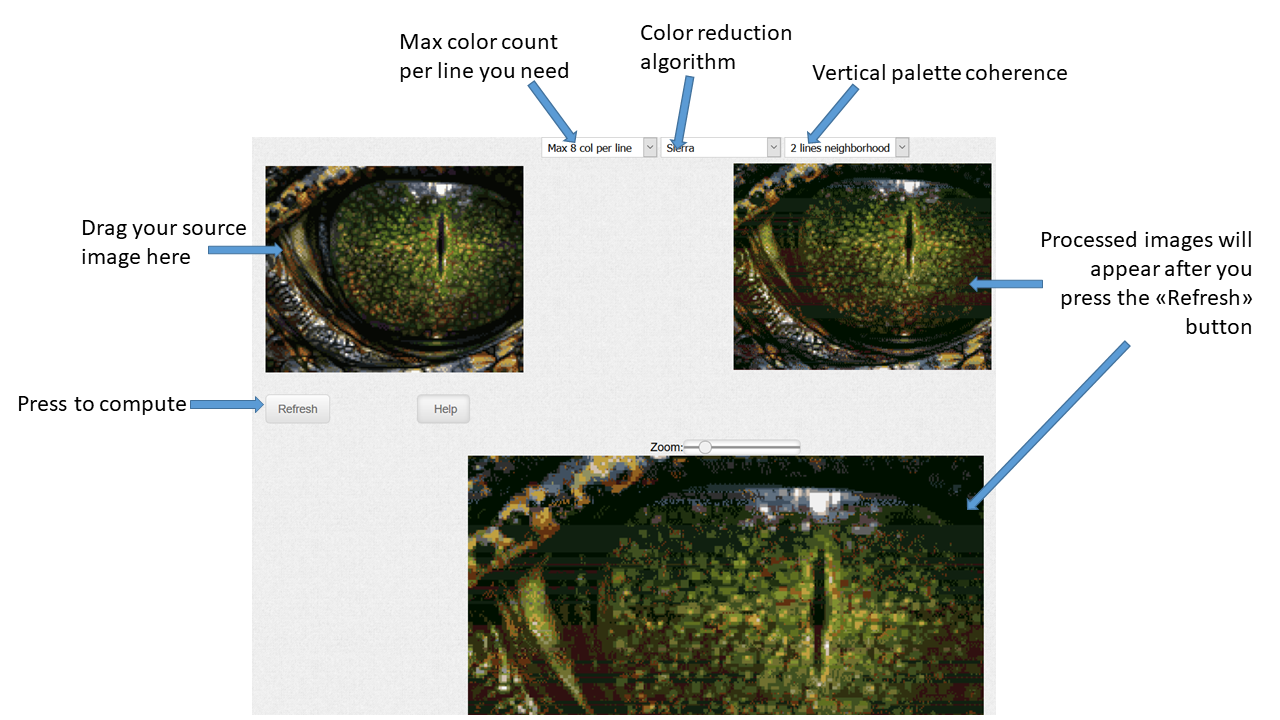
- Make sure your source picture is near from the Amiga final format requirements (multiple of 8 width, not too many colors)
- Drag'n drop your source image on the left "drag'n drop an image here" panel
- Use the top left combo box to define the maximum number of colors per line
- Use the top middle combo box to define the quantization algorithm
- Use the top right combo box to define the height of the quantization box
- Hit "Refresh Display"
- You may right click on the processed image to save it as a png and rework pixels you don't like in Photoshop or such. Then, re-drag'n drop it in the tool
- The bottom window (not seen on the above screenshot) contains the data needed by the coder
Color reduction algorithms
- "Nearest" and "Stupid brutal" are very similar and will use no dithering
- All the other algorithms will use dithering
Vertical palette coherence
By default, each line is independent and has its own palette. This may result in vertically adjacent lines deciding to reduce their palettes in a very different way, provoking ugly horizontal stripes. The "Vertical palette coherence" allows neighbor lines to share the same palette. Not an ideal solution, but helped solving the issue on several images. Also recommended if you want to use dithering for the color reduction algorithm.